
The parameters for the defined floor area are located in the Floor Area Settings dialog.
Location of Floor Area Dialog
You can access the floor area settings dialog by double-clicking on the defined floor area polygon.
Floor Area Settings Dialog
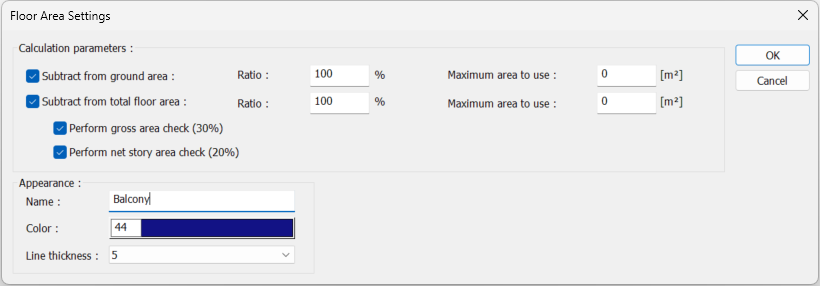
|
Specifications |
|---|
|
Subtract from ground area 
The area of the selected floor area polygon is subtracted from the ground area calculation. Based on the value entered in the ratio box, the area value of the defined floor area polygon is subtracted from the ground area calculation. If a value other than 0 is entered in the 'Maximum Area to Use' box, only the entered value is subtracted from the ground area calculation." |
|
Subtract from total floor area 
The area of the selected floor area polygon is subtracted from the total floor area calculation. Based on the value entered in the ratio box, the area value of the defined floor area polygon is subtracted from the total floor area. If a value other than 0 is entered in the 'Maximum Area to Use' box, only the entered value is subtracted from the total floor area calculation. |
|
Perform gross area check (30%) 
If the option is selected, the area of the selected floor area polygon is included in gross unusable area control. The value defined in the current building bylaws is provided by default. The percentage value here can be modified from the 'Gross unusable area ratio' row in the floor area calculation settings dialog. |
|
Include 20% in your account 
If the option is selected, the area of the selected floor area polygon is included in the control based on the net unusable story area. The value defined in the current building bylaws is provided by default. The percentage value here can be modified from the 'Net unusable story area ratio' row in the floor area calculation settings dialog. |
|
Name 
The selected floor area polygon is given a name. |
|
Colour 
The drawing color of the selected floor area polygon is selected. |
|
Line thickness 
The line type of the selected floor area polygon is selected. |
Next Topic