
The drawings made in AutoCAD may have been made far from the origin point.
-
Select all your drawings by pressing Ctrl + A on the keyboard while in perspective screen.
-
Enter the Move command. Click on a point of your drawing in the plan window to set the reference point.
-
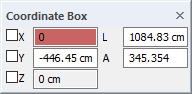
Press the X key on the keyboard. The cursor will go to the X box in the coordinate box. Type the value 0 and press Enter. The number will be covered in red.
-
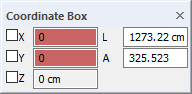
Press the Y key on the keyboard. The cursor will go to the Y box in the coordinate box. Type the value 0 and press Enter. The number will be covered in red.
-
When you click the left mouse button, your drawing will be moved to the origin (0,0) point relative to the reference point.
-
Press the Home key on the keyboard .
-
The perspective camera (the image in its window) will come to the starting position of the program (the angle visible from the origin point).