
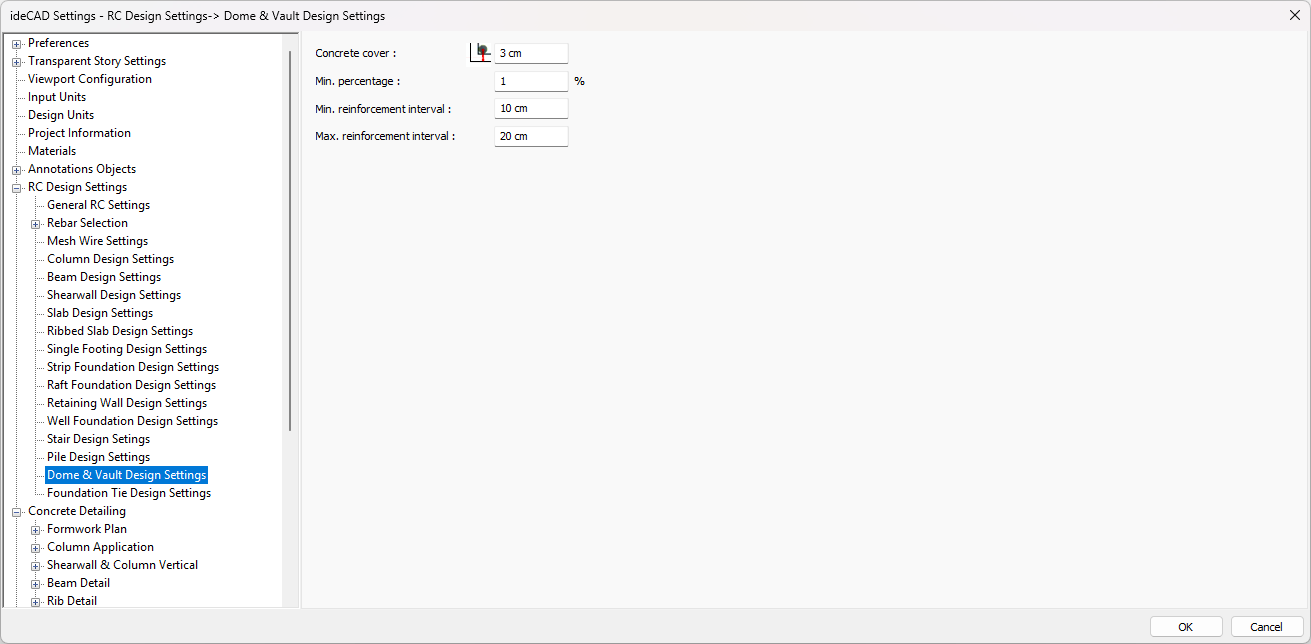
With the Dome & Vault Design Settings, the design parameters used in Concrete Dome and Vault Design are determined. Concrete cover, maximum and minimum reinforcement percentage etc. parameters are determined from the Dome & Vault Design Settings window.
Parameters denoted with “%” refer to the reinforcement ratio expressed as a percentage—that is, the ratio of the area of reinforcing steel to the gross cross‑sectional area of the concrete element, multiplied by 100.
For instance:
-
A minimum reinforcement ratio of 1% corresponds to a steel area equal to 1% of the concrete section.
-
Since a reinforcement ratio of 0.01 (i.e. 0.01 × 100) equals 1%, the value “1” should be entered for this parameter.
All percentage values must be entered as the ratio multiplied by 100. If your design software requires integer percentages, round to the nearest whole number.
|
Specifications |
|---|
|
Concrete cover 
It is the distance from the center of gravity of the dome-vault tensile rebar to the outer face of the concrete. |
|
Min. percentage 
The rebar percentage determines the minimum value of the rebar to be placed in the dome or vault. The percentage value of the gross area of the dome or vault specified in this parameter determines the minimum rebar area. The minimum rebar area of the concrete element means that the gross section will not be less than the percentage value entered with this parameter. The rebar to be placed in the dome or vault is selected to be not less than this area. |
|
Min. reinforcement interval 
This parameter is taken into account when choosing rebar in domes and vaults. If the distance between two rebars is less than the minimum rebar spacing, the rebar diameter is increased. |
|
Max. reinforcement interval 
The distance between two rebars cannot be more than the value entered in this parameter. |
Next Topic